Check out the latest HoneyBook product updates for October 2024: lead forms, enhanced navigation, new templates, and more.
Embedded lead forms
We’re kicking off this month’s product updates with an update to lead forms. You can now embed lead forms directly into your website, which means no more link wrangling and client redirecting. With easy integration and customization options, you’ll be able to capture inquiries while maintaining your site’s design and user experience. Embed lead forms so that leads and clients can book discovery calls, select and pay for services, or simply inquire about working with you–right from any page of your business website.

Files tab
With your top navigation getting a refresh, we’re excited to launch the new Files tab. The Files tab provides a centralized view of your files across all client projects, which lets you find, organize, and manage your files without needing to dive into a specific project. You can also filter by status, so you can get a pulse on all of your drafts, or easily check-up on your sent files. Find the Files tab in your account here.
New templates
Explore new, free HoneyBook templates in the template gallery. The gallery now includes more ready-to-use templates for proposals, service guides, and questionnaires designed to help you get started quickly and professionally. Use HoneyBook templates to create a professional and polished client experience quickly.
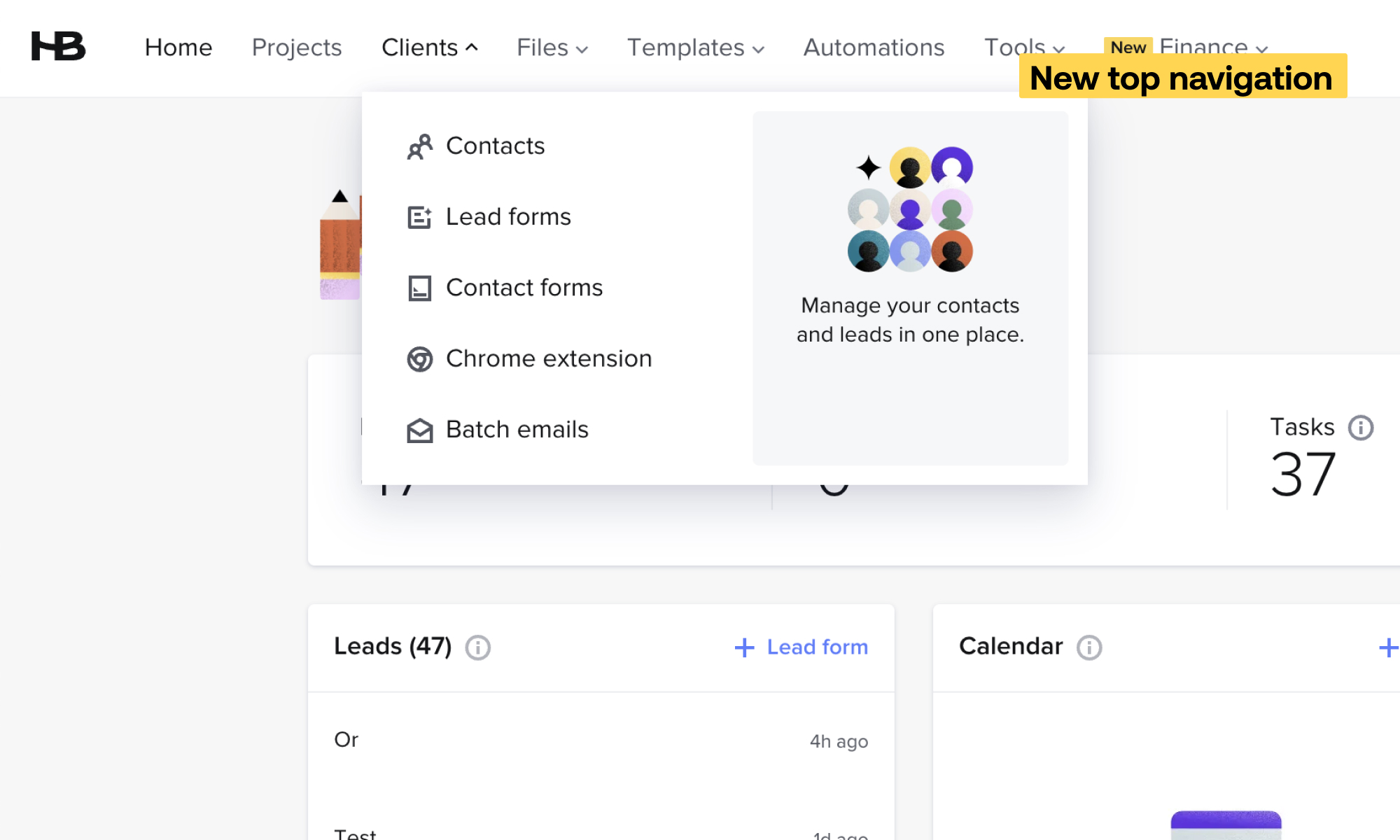
New top navigation
Discover our new top navigation for easier access to the tools and information that matter most for your business. The updated design centralizes features, making it faster and easier to find what you are looking for.
AI Assistant updates
AI Meeting Assistant
Get meeting summaries with action items delivered by the AI Meeting Assistant. The AI Meeting Assistant will join your scheduled video calls in HoneyBook, and you’ll be able to save time and stay focused knowing that the Assistant is taking clear notes.
Project recaps
Gone are the days of improvising meetings–with the help of AI project recaps, you’ll receive an overview of project details, past communication, and open questions 1 hour before each HoneyBook meeting. Feel confident going into every client meeting knowing that you’re prepared and ready to impress.
That’s a wrap for this month’s product updates. We’ll be back again next month with the latest new and improved features to make running your independent business easier and more efficient.

HoneyBook's client relationships platform makes it easy for independent business owners to streamline their processes and create remarkable client experiences by combining essential tasks like an online contract, online invoice, client communication, online payment software, and more all in one place.

Subscribe to the HoneyBook newsletter for the latest and greatest business practices.