17hats vs HoneyBook vs Dubsado: Side-by-side comparison
Start a Trial
Compare three of the top platforms for small business management and see which options are best for lead management, payments, client communication, customer service, and much more.
17hats, HoneyBook, and Dubsado are often compared for their similar offerings. Each one provides business management for small businesses, specifically those that offer personalized services to their clients. This includes photographers, business consultants, designers, marketers, and more.
I wanted to finally put each to the test and compare them on the all of the main features that businesses use, from capturing leads to booking, getting paid, scheduling meetings, managing projects, and more. Though we’re including HoneyBook, I still wanted to provide an unbiased review of our shortcomings and strong suits against these other platforms.
If you’re stuck choosing between these three platforms, jump to the specific features below to learn more or take a look at who won out in each section.
Lead management & CRM features
HoneyBook
HoneyBook offers two options for capturing leads: a standard contact form and a more robust lead form. Both are customizable, but the HoneyBook contact form is a simple way to capture leads, while lead forms enable you to add additional actions, like scheduling a meeting and paying up front.
You can share both forms on your public channels or privately to capture interested leads. I especially like the fact that you can choose from templates or build from scratch and save multiple forms for different audiences.
Once leads inquire, HoneyBook captures them and adds them to your account and project pipeline. I’ve customized my pipeline to match the steps I use to move leads forward to booking, which makes lead management easier. Plus, I like that you can manage all your communication and files in one project workspace with leads and clients.
Another great feature is HoneyBook automations, which I’ve used to set up instant responses and guide leads through next steps, such as filing out a questionnaire, scheduling time, and booking. You can also leverage HoneyBook AI to move faster on leads. When I have leads that seem more likely to book or book a more valuable project with me, I get a notification to let me know that I should respond ASAP. I can then use the AI Composer to quickly create a message for them that uses the information they’ve provided. This is a really great standout feature I’ve noticed from HoneyBook.
HoneyBook does have its limitations with lead management. It doesn’t operate as a traditional CRM where you can score leads or nurture them and access other sales features like marketing automation. In mt use, I think its lead management is great for independent businesses that don’t have a large volume of leads.
17hats
On the leads page, I can see all my recent lead activity, new leads, hot leads, and cold leads. I’ve set up a lead capture form on my website, which enables me to easily capture traffic there. A new project is automatically created when a lead fills out and sends the form in.
To automate, I can use the Workflow feature to send an automated email, such as a thank you message with an included questionnaire. 17hats’ automations allow for basics like sending an email or scheduling a task reminder, but stop short of automating files to send out. I noticed that 17hats also doesn’t have a ton of Workflow triggers to choose from compared to other platforms.
Dubsado
To capture leads in Dubsado, I also have an embedded contact form on my website where prospective can submit their information. From there, they’re added to my Dubsado address book, and a new project is created for them.
I like that the contact forms are customizable, and I can separate my leads by the type of project they’re inquiring about. Dubsado also offers the ability to automatically send follow-up questionnaires specific to each inquiry.
Dubsado’s embeddable contact form is only compatible with Squarespace, Wix, and WordPress, which can be limiting for some business owners.
Contracts
HoneyBook
HoneyBook offers attorney-reviewed contract templates that you can immediately update with your own information and start using with clients. Whether you need a general contract or a specific agreement (liability waiver, proof sign-off, model release, NDA, etc.), HoneyBook has several options to choose from.
As always, I was still able to start from scratch and drop in my own specific legalese that I wanted to use, but the templates are a really great start.
The contract templates include smart fields, which allowed me to dynamically populate client and project information, like client name, project name, and project date. I saw that you can also pull in information that you’ve set for your company, such as payment late fees and your company information.
I love that HoneyBook contract templates are accessible via desktop or mobile, allowing your clients to eSign from any device.
17hats
17hats also offers electronic contracts that my clients and I can sign online. One handy feature is the smart field implementation in contracts and emails, which helps me prefill important details to save time. This is beneficial for me for its ease of use and time savings.
These smart fields work in all of the features, not just the contract, saving me time everywhere I need to fill in client information. Clients can sign contracts that are combined with a proposal and invoice, all in one, making it simpler for them and beneficial for me, as the simplicity of the document itself can potentially convert more leads.
Unfortunately, 17hats doesn’t offer pre-made contract templates, though you can save your own to use again with future clients.
Dubsado
Dubsado offers several pre-populated contract templates for different business types, including coaches, wedding photographers, designers, and more. With each contract template you’re able to add your logo and use smart fields to automatically populate information.
I like using Dubsado’s smart fields since they offer a variety for your project, client, invoice, and business information. By adding them to your contracts, it makes it easy to use the same templates for multiple projects or clients.
You can also edit and save your contracts as templates to reuse them for future clients.
Payments
HoneyBook
With integrated payment processing in your invoice templates, HoneyBook makes it faster for you to get paid. In fact, 90% of HoneyBook invoices get paid on time.
Through HoneyBook, I accept credit card and ACH payments and enjoy some of the lowest transaction fees in the industry, starting at 2.9% + 25¢ for cardholder-entered payments. For reference, PayPal’s cardholder entered fees start at 2.99% + 49¢.
While the integrated payments are helpful for me, I could see that some may not like the inability to choose their own payment processor.
One thing I really love about HoneyBook is that you don’t have to chase payments. You can turn on automatic payment reminders and autopay, along with late payment fees for clients who pay past their due dates.
For greater organization, HoneyBook also enables you to track payment statuses in one place. Plus, view your profit and loss and get greater accounting insights with a seamless integration to Quickbooks.

Smoother payments
Process client payments quickly and securely with some of the lowest fees in the industry.
Get started17hats
Clients can pay me directly with any major credit card or ACH bank transfer using 17hats Payments. I can also set up automated payment reminders so clients will remember to pay. Better yet, I can nudge my clients to set up automatic payments so they’ll never miss one. There are numerous currencies I can bill my clients in as well, which is especially useful if you have international clients.
Transaction fees are reduced for the Premier tier, which costs $50 per month if you’re paying annually or $60 per month if paying by the month. Each time a client pays by e-check or card, the bank charges a fee. Fees are not passed directly to clients, and they start at 2.9% plus $0.30 for users with the Premium plan.
Dubsado
Dubsado offers integrated payments powered through Stripe, and you can set up autopay for invoices and leverage instant deposit for faster payouts. By using Dubsado invoices and payments, you can also leverage payment plan templates and recurring invoicing.
Dubsado’s payment fees start at 2.9% + $0.30 for U.S. cards but have different transaction fees for international cards. I haven’t used Dubsado’s payment processing because I noticed there were quite a few extra fees, such as a failed transaction fee, dispute fee, and instant payout fee.
File templates
HoneyBook
File templates are one of HoneyBook’s strong suits. With an account, you already have a great starting point for every aspect of your clientflow: the process from capturing and qualifying leads to booking clients, managing projects, and maintaining relationships.
You can access all of the following templates, plus build your own:
- Lead forms
- Questionnaires
- Invoices
- Contracts
- Proposals
- Pricing and services guides
- Sales brochures
- Scheduling forms
- Welcome packets
- Project closure files
HoneyBook’s template gallery also offers a variety of templates that are specific to different industries, and are designed by business owners themselves.
17hats
I’ve found that document templates on 17hats can save me time when I’m sending questionnaires, invoices, contracts, and quotes. I can organize email templates by type, such as a proposal or invoice. Plus, I can use the smart fields to easily fill in client information in these templates.
I also like the ability to save contracts as templates, which is handy when I have a boilerplate contract that will be the same regardless of the client. Clients can select add-ons, which is an easy way to let me upsell extra services right from the start. Easy upselling means potentially more revenue.
Dubsado
One thing I don’t love about Dubsado is their templates. They do offer templates for forms, canned emails, packages, workflows, and payment plans.
However, it isn’t intuitive to see how you can save more file templates. For example, you are able to save contracts that you use, but they don’t show up in the templates section of the product menu. Packages are also essentially how you save invoice templates, which is a big confusing.
Scheduling
HoneyBook
Inside your account, you can sync your Google, Microsoft, and Apple calendar. Once you integrate, you can see all of your meetings and appointments in one place, plus add team members to view their schedules in your calendar view as well.
With your calendar synced, you can present an accurate view of your availability within the HoneyBook scheduler. Just like other tools like Calendly, you can build specific session types, set your availability for each one, and send them to leads or clients with a link to book time with you.
Instead of going back and forth to find a time that works, clients can select an open time slot on your calendar. Unfortunately, I found it a bit limiting since you can’t offer group scheduling or rescheduling for clients on HoneyBook.
If you also require clients to pay before scheduling with you (say you’re a photographer or a consultant), you can do so with a lead form or a scheduling file template that includes invoice and payment.

Schedule clients easily with HoneyBook
Skip the back-and-forth: Schedule meetings, sessions, consultations, and more in one click.
Get started17hats
Through 17hats, clients and leads can see when I’m available and request an appointment to reserve a date and time. Sessions can be recurring or one-off, and clients can schedule an appointment, event, consultation, or session.
Unfortunately, there isn’t a public scheduling feature, so I have to add my schedule to a service before the client can book time with me. This means that if they just want some face time, I’ll need to create an email with a service for them to fill in that time. In some cases, that’s preferable to protect my free time. However, it seems like a few extra steps that are unnecessary.
Unfortunately, reminders are not sent automatically, but I can log on and manually send a reminder to a client. Unlike some platforms, there isn’t a feature that suggests optimal times.
Dubsado
As of 2024, Dubsado’s scheduler is still in beta. It’s housed under the Templates section of your account, which feels a bit counterintuitive. There, you can create appointments and scheduler groups. Overall, the feature doesn’t feel intuitive to use, and there seem to be consistent bugs that keep it from functioning the way it’s intended.
Client communication
HoneyBook
With HoneyBook, I don’t have to worry about sifting through emails or missing client communication. You can integrate any email provider with your account so you’re able to see client emails inside your workspaces. The only downside is that you have to start an email thread in your HoneyBook account, so it won’t pull in all of your emails in your inbox.
From there, you can leverage HoneyBook email templates to save time, set up automated emails at key moments (like after a lead inquires), and even use HoneyBook’s AI Composer to quickly send messages to leads and clients that fit your tone and voice. I personally love setting up email automations for my inquiries to make sure I respond quickly and save time providing information to them.
Though I didn’t set one up, you also have the opportunity to create a branded client portal that clients can use to view communications and files in one place.
17hats
Anyone I communicate with in 17hats needs to be set up with a contact category: Hot Lead, Client, Cold Prospects, or Other Contacts. 17hats color codes these categories for easy viewing. It will automatically move a category from “Hot Lead” to “Client” when an invoice is sent or a contract is signed. I can also manually adjust these categories, and using them allows me to designate email blasts to specific categories in my contacts.
I easily access my client communications on the project page. Certain actions can trigger automatic messages, such as when a client completes a document. After they complete the document, they’ll get an automatic thank-you message with an electronic copy of the document.
I can set up automated emails for the thank-you messages as well as document reminders. Anything automated, like sending emails, is a major benefit for time savings.
Dubsado
To keep up with my clients, I’m able to use Dubsado’s customizable client portal. I’ve added my brand to make it more consistent with my website, and I give access to clients to they can find their forms, contracts, and invoices all in one place. I use a landing page on my website for existing clients where I can embed the login, so it’s a self-serve process.
While Dubsado does offer email integration so I can see client communication, I haven’t set it up since it’s limited to Google or Microsoft. You can integrate other email providers through SMTTP, but I haven’t taken the time to do so.
Project management
HoneyBook
After using the platform, you can tell that HoneyBook isn’t focused on project management. But, it does provide some project management tools.
The project pipeline is fully customizable and can be automated, so you can seamlessly move clients and project statuses forward without having to manually keep track. Only you can see your project pipeline though, so I didn’t see a way to share statuses with clients.
I terms of tasks, you can track them in HoneyBook, associate them with specific projects, and assign them to your team members. Within automations, you’re able to set up task reminders so you never miss a deadline, which I find helpful for staying on top of project deliverables.
As you’re working on projects, you can use your project workspace or client workspace to stay on top of communications, files, notes, and information associated with that specific project or client.
17hats
Projects consist of project details, activities, and important documents. The project page neatly stores all aspects of my projects, including events, communications, to-do lists, notes, and documents. It’s nice to have all of those in one place.
However, if you imported your contacts or added them manually, you have to create a project for each one before you can send any emails or make notes about them, which can be tedious. Projects are where all the documents live. If you don’t have a project, you can’t create a document, which I also found a bit limiting.
Especially if you’re trying to switch to this platform from another system, this might cause some frustration.
Standard tiers and higher offer Workflow management, which helps me prioritize items and stay on schedule. I set up a Workflow, and the platform will automatically create due dates for the next steps and provide alerts. I get an automatic to-do list with the day’s most important items.
Dubsado
Though Dubsado isn’t a project management tool, I’ve found that I can still use it for some project management. It includes a pipeline, though the functionality is a little bit difficult to use. You can edit columns in the pipeline and add custom tags, but you can’t edit the stages of your pipeline.
There’s a simple task list that you can use, though I prefer to use a separate task management platform. Within the task list, you can add a summary, attach it to a project, and add an assignee and due date. Dubsado will remind you when your task is due, which is helpful for business owners who might not have a large volume of tasks to stay on top of.
When it comes to managing each project, you do have a notes section where you can view your activity log, call log, and manual notes.
For more hands-off project management, you can also use Dubsado’s workflow templates, which are sequences of automations.
Reporting
HoneyBook
HoneyBook offers several reports to provide insights on things like:
- Monthly bookings
- Booking rate
- Collected payments
- Outstanding payments
- Refunded payments
- Lead sources
Though you can select a specific time frame to view each report, it is a bit limiting that you can’t customize any of the reports.
Premium HoneyBook users can also access team member and client reports.
17hats
For financial reporting, I can integrate my QuickBooks Online account, where financial data can be exported for further analysis and recordkeeping. However, there’s a small added cost for this integrations except for the Premium tier plan.
Certain reports are automatically created on the platform, though you only have access to the client sales and sales tax reports on the Essentials plan.
- Sales tax: This is available in all tiers. Since I have to pay any sales tax I collect to the state, it’s nice to have an automatic report.
- Client sales: This is available in all tiers.
- Product sales: This is available in the Standard and Premier tiers.
- Profit and loss: Income is automatically populated in all tiers. This is handy when I’m doing my taxes, and also just to keep an eye on the health of the business.
- Product report: This lets me see which products are doing well and which ones I could consider removing from my offerings. Not available in the Essentials tier.
There is a “Print to PDF” option if you like to keep paper files of your reports, but it’s not available on every tier.
Dubsado
Dubsado offers the following reports:
- Project sources
- Project breakdown
- Invoices
- Transactions
- Chart of accounts
- Income, expenses, net profit, and sales
Mobile app
HoneyBook
Within the HoneyBook mobile app, you can view your project pipeline to see statuses at a glance, plus view and edit your task list. You’re also able to manage your calendar and share your scheduler link along with other client communication, like sending and editing files.
Though you can customize your notifications, you have the option to get notified when you have a new message, when a client views a file, when someone signs a contract or pays an invoice, and when you have a task coming up.
Another great feature of the mobile app is time tracking. If you price your services by the hour, the time tracker enables you to stay on top of your working hours, then easily create an invoice directly from your tracked time.
Though the app is robust, I find it to be more of a companion to the desktop site since it doesn’t offer all of the same capabilities.
17hats
The 17hats mobile app is available on both iOS and Android. The free app features the same dashboard to the one on the website, showing project details, emails, and documents. I just need to tap on the 3-line icon for a menu showing further navigable items, such as the to-do list or recent client activity. Ultimately, it offers the same functionality as the website.
The Android app is available for phones, tablets, and Chromebooks. The iOS app is available for iPhones and iPads.
Dubsado
Dubsado recently launched a new mobile app in 2024. Though I haven’t had the chance to use it yet, the Dubsado website states that it offers on-the-go project management, client communication, and invoicing. Overall, it doesn’t seem as comprehensive as 17hats or HoneyBook’s mobile apps, but Dubsado will likely continue to add more features to make it on par with the desktop site.
Integrations
HoneyBook
HoneyBook offers the following integrations:
- Email and calendar (multiple platforms): Integrate your Gmail, Outlook, iCloud, or other email provider to centralize your client communication and calendar.
- QuickBooks: Sync your income information from HoneyBook into QuickBooks for more comprehensive online accounting (only one-way sync from HoneyBook to QuickBooks).
- Calendly: Integrate with Calendly to sync Calendly meetings onto your HoneyBook calendar or pull information from your HoneyBook calendar into Calendly.
- Facebook: Integrate with Facebook Lead Ads so you can populate your new leads directly into HoneyBook.
- Pic-Time: If you’re a photographer, you can use the Pic-Time integration to create new galleries, connect existing ones, and see the status of connected galleries all from HoneyBook.
- Zapier: Use Zapier to automate more with your favorite tools, like Trello, Asana, Clickup, Google Drive, and more.
17hats
We all have our favorite apps for email, calendars, and bookkeeping. Platforms such as 17hats let me integrate different apps and services so I can use my favorite apps on one central platform, without having to jump around from app to app.
17hats integrations include:
- Email providers
- Google Calendar
- Apple Calendar
- QuickBooks
- Zoom
- Fundy, N-Vu, ShootProof, and ProSelect for photographers
- WeddingWire and The Knot for wedding leads
- Financial institutions such as Bank of America, Citibank, and thousands of others
- Zapier to connect to thousands of more apps
Dubsado
Dubsado offers the following integrations:
- Video conferencing: Connect Google Meet, GoTo Meetings, Microsoft Teams, or Zoom
- Email integration: Within your HoneyBook account, sign in with Google or Microsoft, or use SMTTP to connect with other types of email accounts.
- QuickBooks: Connect your QuickBooks Online account, import QuickBooks tax codes, and manually sync invoices and payments with QuickBooks.
- Xero: Use a one-way sync to send your Dubsado invoices and payments to Xero.
- Zapier: Use triggers and actions to connect with your preferred third-party apps, like Asana, ClickUp, Notion, and more.
Customer support
HoneyBook
When you’re first getting started with HoneyBook you can access their free file setup service, which migrates existing files like your pricing lists, contract language, client questionnaires, and more. Within 72 hours, you’ll have your templates successfully added to your HoneyBook account, all without lifting a finger.
HoneyBook offers live chat and email support seven days a week from 7 a.m. to 7 p.m. PT, along with an AI chat resource that can help answer questions easily and quickly.
You can also leverage HoneyBook’s self-service resources like its Help Center and live and on-demand webinars.
A great benefit of HoneyBook is that it offers one-on-one dispute resolution, so you’re in good hands if you’re faced with a client chargeback. If you receive a dispute, a HoneyBook Dispute Specialist will work with you to collect evidence and respond to your band on your behalf.
HoneyBook doesn’t offer any phone support, except for billing issues and dispute resolution.
17hats
Customer support includes a help desk with frequently asked questions, email support, Facebook direct messages, and live chat support from 7 AM to 4 PM PT on Monday through Friday. I can access my chat history to review and refer to the support team’s responses.
If you’re just getting started, there are 32 articles on how to set up an account and get your business running with 17hats. Unfortunately, I wasn’t able to find a direct number for phone support.
Dubsado
To get started in Dubsado, you can send up to 10 of your existing forms, and Dubsado will recreate them in the platform for you. While it seems like it’s a great way to get set up quickly, it isn’t clear if a form just means your existing contact forms, or if it includes files like contracts and invoices.
Compared to other platforms, Dubsado does offer a wide variety of different support options. If you’re having trouble, you can reach out via chat or email seven days a week. You can also book a demo or a free 1:1 screen share session.
For self-serve support, you can Dubsado’s training videos on YouTube, its webinars, and its help center articles.
Pricing and value comparison
HoneyBook
17hats
Dubsado
Summary
17hats, HoneyBook, and Dubsado each have different strong suits, though they offer a very similar set of tools. Ultimately, I found that HoneyBook offered a bit more in most areas. However, the platform you choose will ultimately depend on your specific needs as well as what type of business you manage.
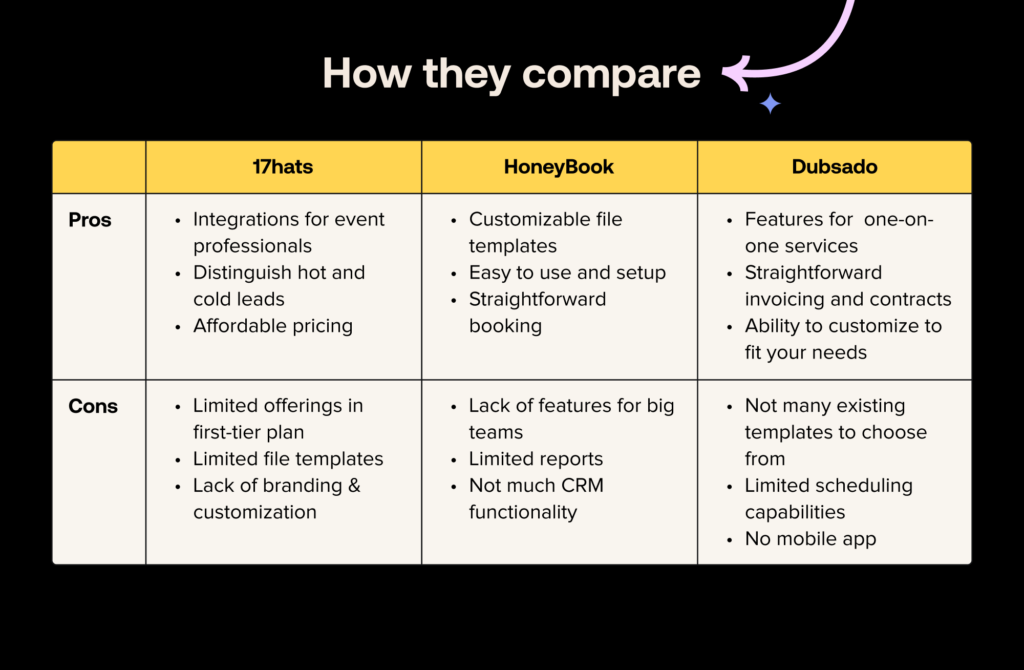
Pros and cons
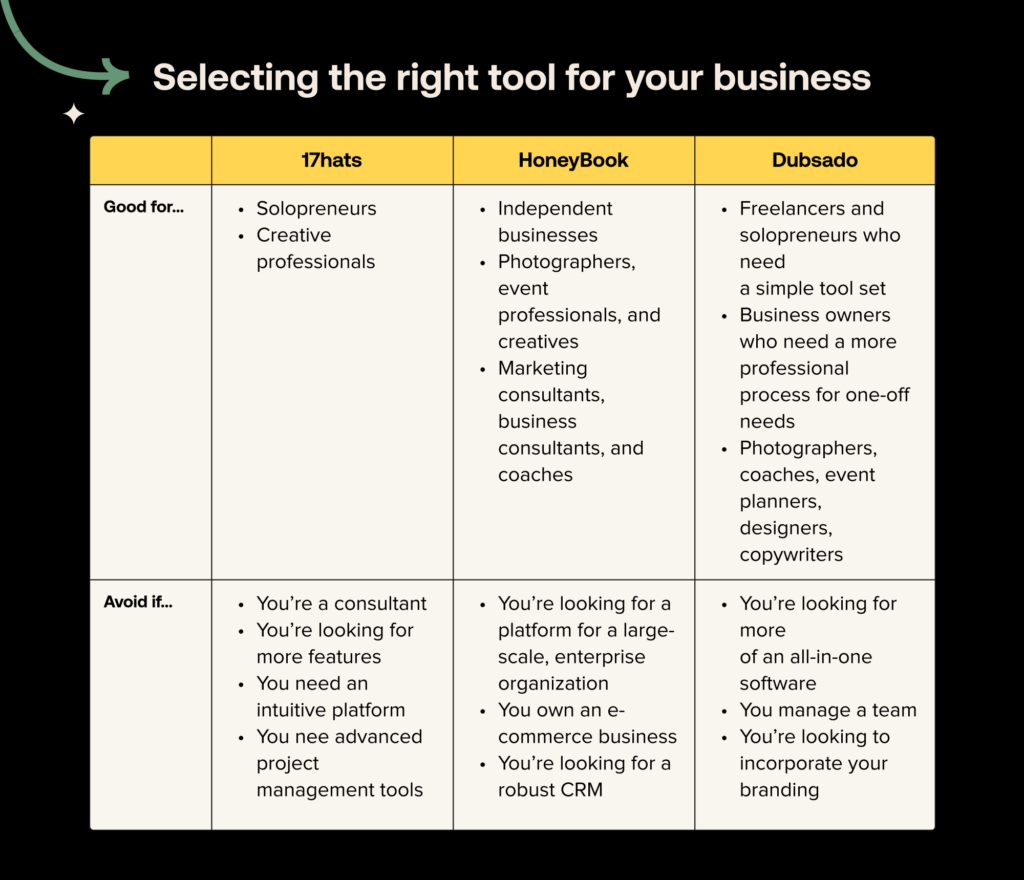
Choosing the right tools
Centralize your client management
Capture leads, sell services, manage projects, and nurture client relationships from one platform. All that and more with HoneyBook.
Get started
Brittany is on the UX Research team at HoneyBook and conducts unbiased competitor research to better understand how HoneyBook fits into the landscape of platforms for small business owners. She enjoys speaking directly with HoneyBook users to understand more about their businesses and pain points. In her downtime, she loves reading and spending time outside around the Detroit area.

Subscribe to the HoneyBook newsletter for the latest and greatest business practices.